
| Heading | ||||
Prepared by: EH | Approved by:
| Valid from: 280426 | Document no.:
| Rev. no.
| |

1. Error Overview
Definition: The system has triggered an E40 Error, indicating that two "Dummy" cassettes (cassettes without active electrodes) have been detected simultaneously. This usually points to a physical alignment issue or a faulty proximity sensor.
2. Symptom Checklist
- When attempting to start the unit the system will stop and display an E40 error code on the iPM and external controllers.
3. Potential Root Causes
- Misalignment: The sensor is too far from the bolt (re-verify the 1mm gap).
- Sensor Failure: The proximity sensor is defective and providing no signal.
- Wiring Issue: Check for loose connections between the sensor and the iPM Generator.
4. Step-by-Step Resolution
- Phase 1: Physical Inspection & Gap Calibration
The most common cause of a false dummy reading is an incorrect air gap between the proximity sensor and the cassette bolt.
- Locate the Sensors: Remove the cassette to access the internal proximity sensors. These are not the red magnet sensor near the operator side they are located towards the middle or read of the rails.
- Inspect the Cassette: Ensure the cassette being used is an electrode-equipped model and not a dummy.
- Check the Gap:
- Measure the distance between the proximity sensor face and the bolt on the cassette.
- Specification: The distance must be approximately 1mm.
- Adjust if Necessary: If the gap is too wide, the sensor will not trigger, causing the system to misidentify the cassette as a "dummy."
- Phase 2: iPM Generator Input Diagnostics
Use the iPM Generator interface to verify if it is receiving the correct signals from the hardware.
- Navigate to Inputs:
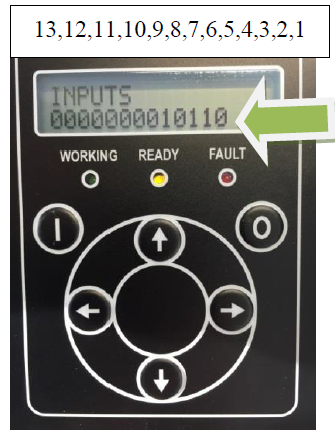
- On the generator keypad, press the Left Arrow Key.
- Scroll Up until you reach the Inputs Screen.
- Interpret the Display:
- The inputs are read from Right to Left.
- Digital Input 7 (DI7): The 7th digit from the right.
- Digital Input 8 (DI8): The 8th digit from the right.
Cassette Type | Target Side | Expected Digital State (Binary) |
Electrode Cassette | Side A | 5th and 7th digits = 1 |
Electrode Cassette | Side B | 6th and 8th digits = 1 |
Dummy Cassette | Either | Only 5th or 6th digit = 1 (7th/8th remain 0) |
- Phase 3: Manual Sensor Functionality Test
Before assuming the sensor is dead, you can perform a manual "Tap Test" to isolate the electronics from the mechanical alignment.
- Clear the Station: Remove all cassettes from the station.
- Monitor the iPM Screen: Stay on the Input Screen (Left arrow -> Scroll Up).
- Manual Trigger: Hold a clean metal screwdriver or a small piece of steel directly in front of the sensor face (within 1mm).
- Observe Response:
- If the 7th or 8th digit flips to "1": The sensor and wiring are functional. The issue is likely the mechanical alignment or the bolt distance on the cassette.
- If the digit stays "0": The sensor is either not receiving power, the signal wire is broken, or the sensor itself has failed.
- Phase 4: Fault Isolation & Resolution
Compare your physical observations with the digital inputs to determine the root cause.
- Scenario: Cassette is inserted, but 7th or 8th digit remains "0"
- If the 5th/6th digit is "1" but the corresponding 7th/8th digit is "0", the system believes a dummy is present because the proximity sensor failed to trigger.
5. Escalation
- If the gap is confirmed at 1mm, the manual screwdriver test fails to flip the bit, and the input remains "0," replace the proximity sensor.